
Hybrid Solar System Diagram: How Panels, Battery and Grid Connect
Last checked · JH Solar guide
A hybrid solar system diagram shows three power sources working together: your solar panels, a battery, and the grid from Meralco or your electric cooperative. One hybrid inverter sits in the middle and decides, second by second, which source feeds your home. This guide explains every block and line so you can read the plan your installer gives you and check the work.
People search for a hybrid solar system diagram because brownouts are common and they want solar that still works when the lights go out. A hybrid is also tied to your AC panel and the grid, and that part is done by a licensed electrician (a registered master electrician or professional electrical engineer).
Reading the hybrid solar system diagram
Start at the top left of the hybrid solar system diagram and follow the power. Sunlight hits the panels, DC power flows through a safety box, and the hybrid inverter turns it into AC for your home. The battery hangs below the inverter, and the grid connects on the right through your main breaker.
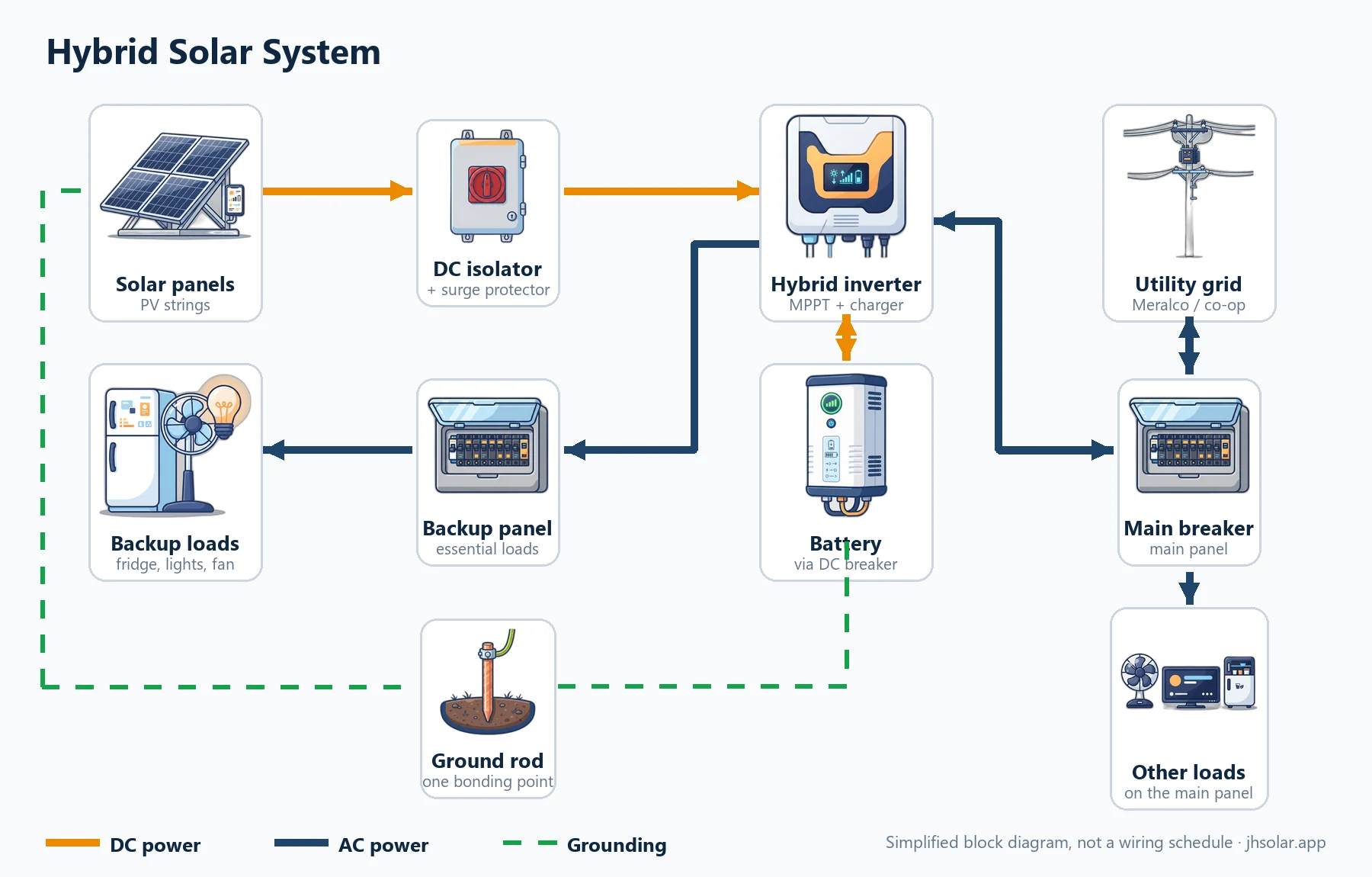
Solar panels connect through a DC isolator and surge protector to a hybrid inverter. The inverter charges and draws from a battery through a DC breaker. Utility power enters through the main breaker to the inverter grid input, and can flow back out when exporting is allowed; the inverter backup output feeds a backup sub-panel for essential loads, while other loads stay on the main panel. The panel frames, isolator and inverter bond to a grounding rod.
Each box is a real piece of equipment, listed below in the order power travels. If your installer’s plan is missing one, ask why. New to these drawings? Our guide to reading any solar setup diagram covers the symbols first.
| Block | What it does | Who installs it |
|---|---|---|
| Solar panels (PV strings) | Turn sunlight into DC power, wired in strings to the MPPT inputs. | Installer, on a mounting system rated for wind |
| DC isolator + surge protector | Switches the panels off for service; diverts surges to ground. | Installer, close to the inverter |
| Hybrid inverter | Tracks the best panel voltage (MPPT), charges the battery, makes AC, and syncs with the grid. | Installer and licensed electrician |
| Battery + DC breaker | Stores energy for nights and brownouts; the breaker protects its cables. | Installer, following the battery manual |
| Utility grid + main breaker | Brings Meralco or co-op power to the inverter’s grid input and to the rest of the house. | Licensed electrician only |
| Backup panel (essential loads) | Sub-panel fed by the inverter’s backup output; stays on in a brownout. | Licensed electrician only |
| Ground rod | Bonds frames, the inverter and enclosures to earth. | Installer and licensed electrician |
A block diagram, not a wiring schedule. Wire and breaker sizes come from the manuals and the electrician.
What each line and color means
Orange lines carry DC: panels to inverter, and inverter to battery. Navy lines carry AC: grid through the main breaker into the inverter’s grid input, and the backup output to the backup panel. Green dashed lines are grounding.
The battery line works both ways, and with utility approval the grid line can too, as the two-way arrows in our hybrid solar system diagram show. Our inverter types guide compares hybrid inverters with grid-tie and off-grid models. For a plain-language primer, see the US Department of Energy’s inverter basics.
Operating modes: solar first, battery priority, grid charging
The same hybrid solar system diagram behaves differently depending on the inverter mode. Brands name modes differently, so match the idea, not the label, and write down what your installer sets.
Solar first (self-use)
Solar feeds your loads first. Extra solar charges the battery. When the sun drops, the battery takes over until it reaches the reserve level you set, then the grid fills the gap. It suits homes that want to use as much of their own solar as they can.
Battery priority (backup reserve)
The inverter keeps the battery full for brownouts while solar and grid run the house. It suits areas with frequent long outages.
Grid charging
The battery charges from the grid, for example before a typhoon. It uses grid kWh, so turn it off afterward.
Backup when the grid fails
When the grid drops, the inverter opens its grid connection (anti-islanding) and keeps the backup output alive from the battery and panels. Main-panel loads go dark; backup-panel loads keep running. When the grid returns and stays stable, the inverter reconnects on its own.
The essential-loads backup panel
Most hybrid setups do not back up the whole house. The electrician moves a few chosen circuits from the main panel to a small backup panel fed by the inverter, the box labeled “Backup panel” in the hybrid solar system diagram.
How to choose backup loads
- Start with what you truly need: lights, fans, the refrigerator, Wi-Fi, phone charging and any medical devices.
- Leave out big heat loads such as water heaters, electric ovens and clothes dryers.
- Think hard before adding an aircon. It can run on backup, but it needs a bigger inverter and battery.
- Keep the total running watts under the inverter’s backup output rating, and allow for motor start-up surge.
Write your list per circuit, not per appliance: if the refrigerator shares a circuit with the kitchen outlets, everything on that circuit moves together.
Battery sizing for brownouts
The battery in a hybrid solar system diagram only needs to cover your backup loads through the longest brownout you plan for. Our solar computation page uses the same method: watts × hours, then adjust for usable capacity and losses.
| Load (example) | Watts × hours | Energy |
|---|---|---|
| LED lights | 60 W × 6 h | 0.36 kWh |
| Two electric fans | 120 W × 6 h | 0.72 kWh |
| Refrigerator (average draw) | 100 W × 6 h | 0.60 kWh |
| Wi-Fi router and phone charging | 30 W × 6 h | 0.18 kWh |
| TV | 80 W × 3 h | 0.24 kWh |
| Total backup energy | Sum of the rows | 2.10 kWh |
Example only. Read the watts from your own appliance labels and use your own hours.
Example: 2.10 kWh ÷ (0.80 usable × 0.90 efficiency) = 2.10 ÷ 0.72 ≈ 2.92 kWh nominal battery. The 0.80 and 0.90 are example assumptions; your battery’s datasheet gives the real usable depth and efficiency.
Example with a larger battery: the JH Solar Version 2 battery is rated at 15.36 kWh nominal. 15.36 × 0.80 × 0.90 ≈ 11.06 kWh reaches AC loads, which is about 11 hours at a constant 1 kW under those example assumptions; real backup time depends on your loads, the charge level when the brownout starts, and the weather. For battery chemistry, lifespan and placement, read our solar battery sizing guide.
MPPT string check: cold Voc, hot Vmp and Isc
The panels in a hybrid solar system diagram are drawn as one box, but they are really strings wired to the inverter’s MPPT inputs. Each input has power, voltage and current limits, and a string that passes on power can still fail on voltage. The maximum power point tracking article explains what the tracker does inside the inverter.
| Check | Why it matters | Compare against |
|---|---|---|
| Cold Voc | Voltage rises when cells are cold. Voc × panels in series, corrected for the coolest morning, must stay under the limit. | Inverter maximum DC input voltage |
| Hot Vmp | Voltage drops when panels are hot. Vmp × panels in series must stay inside the MPPT range. | MPPT operating voltage range (minimum side) |
| Isc | String (or parallel strings) current must not exceed the input limit. | Maximum input or short-circuit current per MPPT |
| Power | Total panel watts on one tracker should fit its rated PV input. | Rated PV input per MPPT |
Use the panel and inverter datasheets, including temperature coefficients.
Example with the JH Solar Version 2: it is rated for 2 MPPT inputs at 5,500 W PV input each. The package uses 14 × 720 W = 10.08 kWp. Split evenly, that is 7 panels per tracker, or 5,040 W (5.04 kWp), which fits the 5,500 W input by power only. How those panels are arranged in series and parallel must still pass the cold Voc, hot Vmp and Isc checks against the panel and inverter datasheets.
The all-in-one unit: a hybrid in one cabinet
An all-in-one unit is still a hybrid solar system diagram, with the inverter and battery sharing one cabinet inside a dashed box. Everything outside the box stays the same.
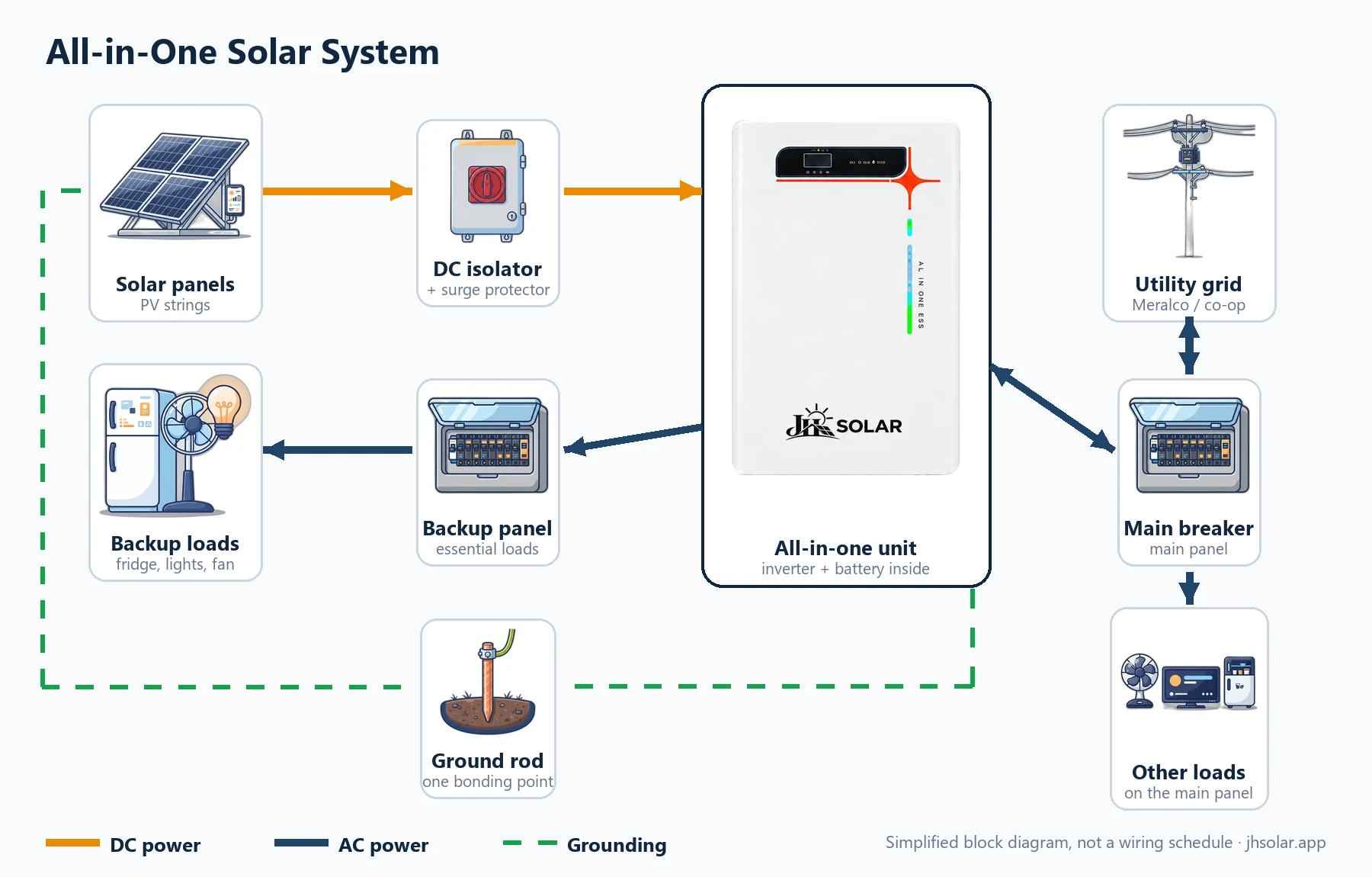
Solar panels connect through a DC isolator and surge protector to an all-in-one unit that holds the hybrid inverter and the battery in one cabinet. Utility power feeds its grid input through a breaker, and its backup output feeds the essential-loads panel.
Both systems from JH Solar are built this way. The JH Solar Version 1 package pairs its all-in-one unit, rated at 7 kW and 16.38 kWh, with 6 × 620 W panels (3.72 kWp). The JH Solar Version 2 package uses 14 × 720 W panels (10.08 kWp) with a rated 11 kW inverter and 15.36 kWh battery. You can compare JH Solar Version 1 and Version 2 in detail; the price is confirmed after a site assessment.
The benefit is fewer separate parts. The trade-off is that expansion and service depend on that one unit, so ask about added battery options and support before you buy.
Step-by-step installation process
You will not wire the grid side yourself, but knowing the order helps you check progress. This is how a typical job moves from a plan on paper to a working system.
Step 1: List your loads and backup needs
You list appliances, hours and the circuits that must stay on in a brownout. Bring a recent bill. This step is yours.
Step 2: Site assessment and design
The installer checks roof, shading and main panel, then plans strings, battery size and backup circuits.
Step 3: Permits and utility paperwork
The LGU electrical permit is filed before work starts. If you plan to export, the net-metering application follows your utility’s steps; some papers, such as the CFEI, only come after the finished work is inspected.
Step 4: Mount the panels
Rails are fixed to the roof structure with sealed penetrations, suited to typhoon wind loads.
Step 5: Run the DC side
PV cables run in conduit to the DC isolator; polarity and string voltage are checked before connection.
Step 6: Set the inverter and battery
The inverter and battery go in a shaded, ventilated spot above flood level. The battery connects to the inverter through its DC breaker, which stays open until commissioning.
Step 7: Wire the AC side (licensed electrician)
The RME or PEE connects the grid input, builds the backup panel and moves the chosen circuits. You watch, ask, and photograph the labels.
Step 8: Ground and bond everything
Frames and rails are bonded as they go up; the inverter, enclosures and ground rod connection are completed and checked before anything is switched on.
Step 9: Commission and hand over
Settings are entered, a brownout is simulated, and you get the app, manuals and warranty papers.
Commissioning checklist
Use this checklist on handover day to confirm that what was built matches the hybrid solar system diagram. You do not touch the wiring; you ask to see each result and note it down.
| Check | What you should see | Who does it |
|---|---|---|
| String voltages | Measured Voc for each string is written down and close to the design value | Installer |
| Breaker labels | Every DC and AC breaker labeled, including the backup panel circuits | Licensed electrician |
| Battery settings | Correct battery type, communication with the inverter, reserve level set | Installer |
| Mode and export limit | Mode set as agreed; export limited unless the utility approved it | Installer |
| Grounding | Frames, rails, inverter and enclosures bonded; ground connection checked | Licensed electrician |
| Brownout test | Main breaker off: backup panel stays on, other loads go dark, then restore | Licensed electrician |
| App and records | App linked to your account; settings photographed; manuals and warranty handed over | Installer and you |
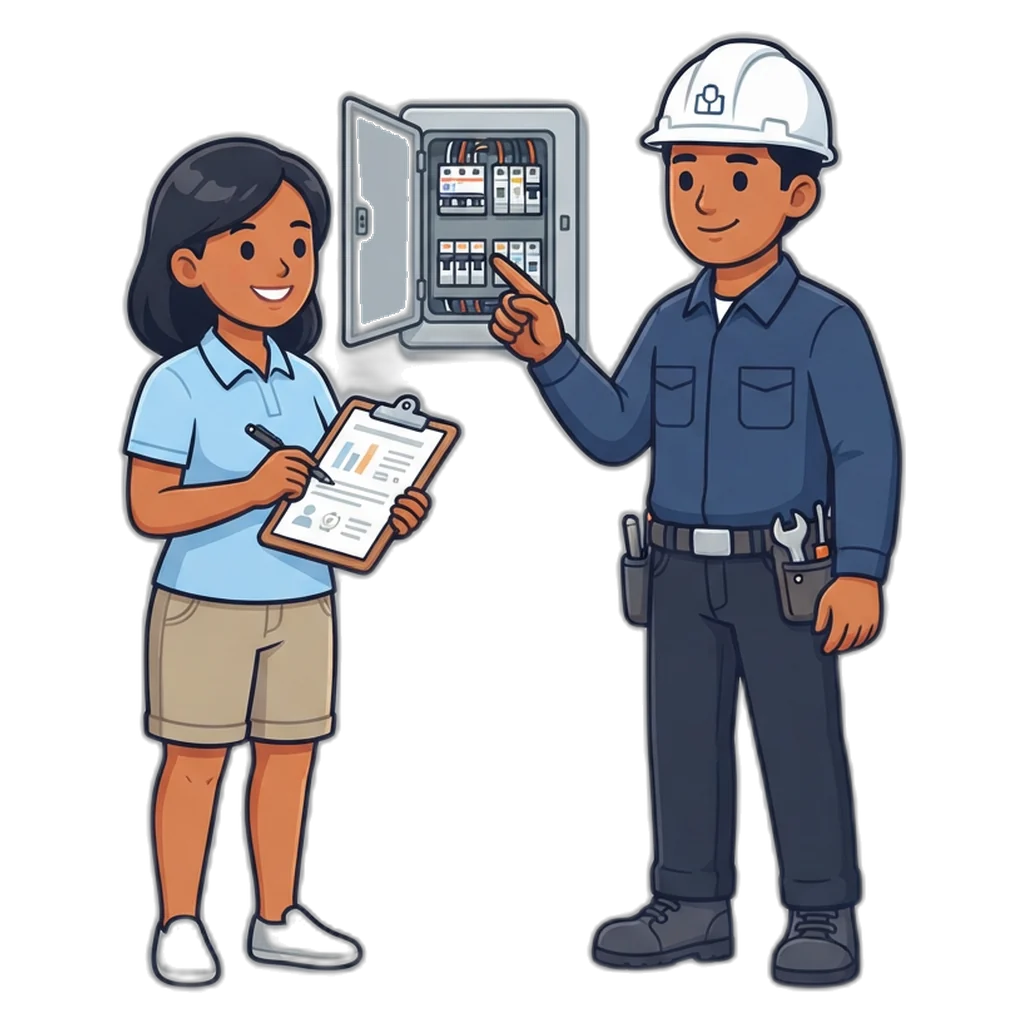
Hybrid vs off-grid vs grid-tied
A hybrid keeps the grid like a grid-tied system and adds a battery like an off-grid one. Our on-grid system diagram and net metering guide covers the no-battery option in depth.
| Feature | Hybrid | Off-grid | Grid-tied |
|---|---|---|---|
| Grid connection | Yes | No | Yes |
| Battery | Yes | Yes | No |
| Power in a brownout | Yes, on the backup panel | Yes, it never used the grid | No, shuts down for safety |
| Can export with net metering | Yes, after utility approval | No | Yes, after utility approval |
| Main strength | Bill help plus backup | Works where there is no grid | Simplest way to cut daytime use |
| Main weakness | More parts and settings | Must be sized for bad weather | No backup without a battery |
| Who wires it | Licensed electrician for AC and grid | DIY possible for small DC kits only | Licensed electrician |
On your phone: monitoring tips
Most hybrid inverters send readings over Wi-Fi or a data dongle to a phone app from the inverter maker. The app shows the same flows as your hybrid solar system diagram.
- Check the battery percentage each evening, and again before a typhoon or a scheduled brownout.
- Turn on alerts for faults, grid loss and low battery so you hear about problems early.
- Screenshot your settings after commissioning so you can spot changes later.
- Do not change grid or export settings yourself. Ask the installer.
Hybrid solar in the Philippines
Brownouts are the main reason Filipino homes choose a hybrid. Maintenance, storm damage and supply issues can all cut power, and a battery-backed panel keeps fans and the fridge running. Peak sun hours are typically about 3.5 to 5 a day depending on place and season; look up your city on the Global Solar Atlas before you size anything.
The rainy season brings weeks of low solar output; a hybrid leans on the grid then, and can charge the battery from it before a storm. Heat matters too: keep the inverter and battery in shade with good airflow, not on a west wall in full afternoon sun.
Net metering with a hybrid solar system
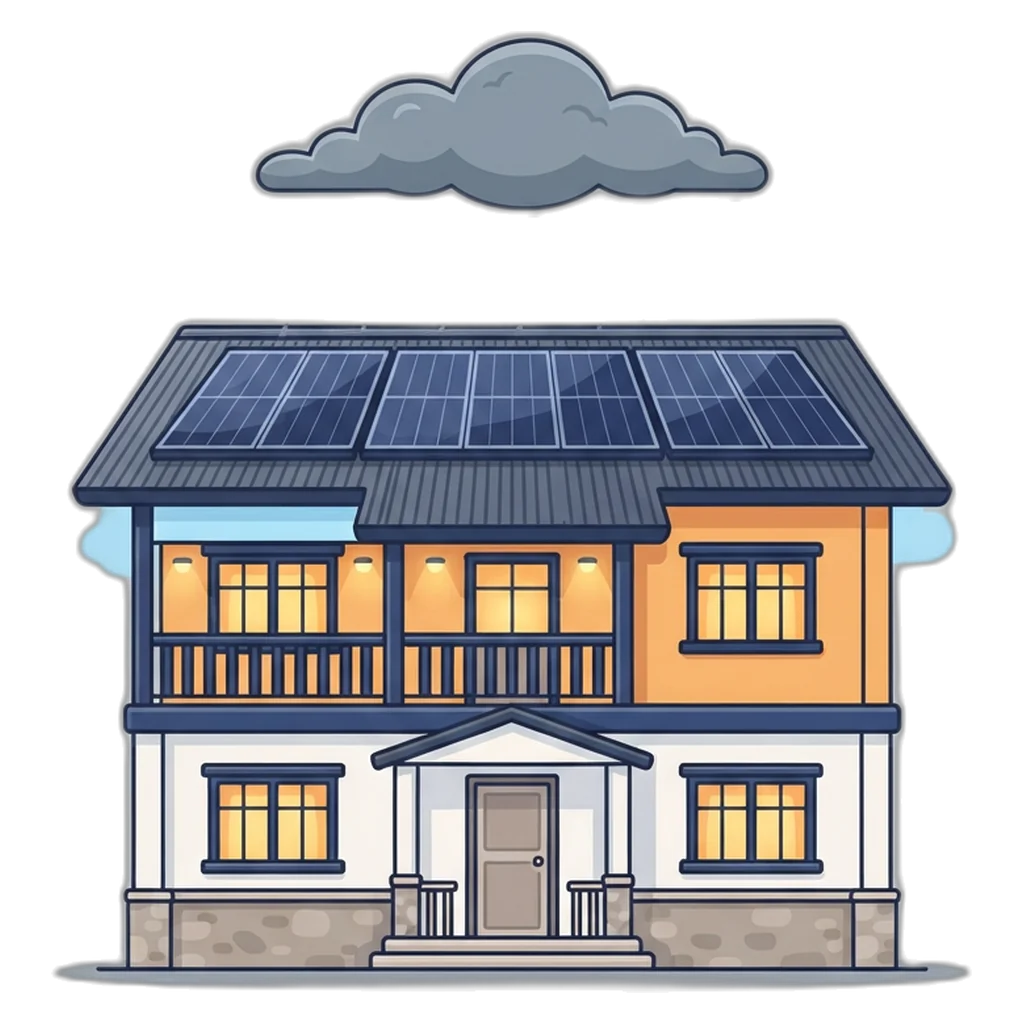
A hybrid can join net metering. The DOE counts renewable systems with or without battery storage, so Meralco customers and cooperative members can apply through their utility once the setup is approved. In a hybrid solar system diagram, export follows a fixed order: solar feeds your loads, then charges the battery, and only the surplus flows out through the bidirectional meter.
That order means a hybrid usually exports less than a grid-tied system of the same size, so backup matters more than credits. Exports earn credit at the utility’s blended generation cost, lower than the rate you pay, and since the 2025 rule changes unused credits roll over to later bills. Until approval, your installer sets the inverter to zero or limited export. The Meralco net metering FAQ lists the documents, and our net metering guide for the Philippines covers every step, fee and timeline.
Safety and Electrical Reminders
- The grid input, the main panel and the backup panel are AC work for a registered master electrician or professional electrical engineer. The IIEE publishes the Philippine Electrical Code they follow.
- A hybrid has more than one live source. Switching off the main breaker does not make the backup panel safe.
- Open the DC isolator and the battery breaker before anyone opens the inverter, following the manual’s shutdown order.
- Never connect a generator to the backup panel without a proper transfer switch planned by your electrician.
- Keep the battery cabinet dry, shaded and clear of flammable items, and above any known flood level.
- After a typhoon, check mounting, cables and the isolator box from the ground before anyone goes on the roof.
Solar panels make DC power whenever light hits them, and batteries hold enough energy to start a fire if they are shorted. Work on the grid side, the AC panel board or a net-metered system belongs to a licensed electrical practitioner following the Philippine Electrical Code. Our numbers are estimates, not a design or a quote.
Frequently Asked Questions
Can a hybrid inverter power my house during a brownout if I have no battery yet?
It depends on the model, so read the manual before you count on it. Some hybrid inverters can feed the backup output from solar alone in daytime, but output then rises and falls with every cloud, and nothing runs at night. If backup matters to you, plan the battery from day one so the backup panel stays steady.
Should my aircon be on the backup panel of a hybrid system?
Only if the inverter and battery are sized for it. An aircon draws far more energy per hour than lights, fans and a refrigerator, so it can drain a battery quickly during a long brownout. A common approach is to keep the aircon on the main panel and put only small essential loads on backup. Work it out with your installer first.
Can I add more battery to a hybrid system later?
Often yes, but only with batteries the inverter maker lists as compatible, and usually the same model and firmware as the first one. Mixing old and new packs or different brands can cause communication errors or uneven charging. Ask your installer before you buy, and plan the cabinet space and the DC breaker size at the start.
Can a hybrid system send extra solar power to the grid?
Many hybrid inverters can export, but in the Philippines you may export only after the distribution utility approves your connection, for example under net metering with a bidirectional meter. Until then, the inverter is usually set to limit export. Your licensed electrician sets this during commissioning and the utility checks it.
Why does my hybrid system still buy some grid power at night?
Common reasons: the battery reached its low limit (the reserve kept for brownouts), the inverter is in a mode that saves the battery, or a large load like an aircon or water heater went above what the inverter or battery can supply. Check the mode and the reserve setting in the monitoring app, then ask your installer.
Is an all-in-one unit easier to install than a separate inverter and battery?
In one way, yes: the battery link is inside the cabinet, so the installer has fewer DC cables to size and run on site. Otherwise the layout is the same: PV strings, DC isolator, surge protection, grounding, the grid input and the backup panel. That AC work still needs a licensed electrician.
Conclusion
A hybrid solar system diagram is easier to read once you know the pattern: panels and DC safety on the left, the hybrid inverter in the middle, the battery below, the grid on the right, and a backup panel for the loads that matter in a brownout. Choose your backup loads first, size the battery from them, and let your installer check every string against the inverter limits.
Your part is simple but useful: write the load list, follow the steps as the job moves along, and use the commissioning checklist on handover day. The AC and grid wiring stays with a licensed electrician.
Plan your hybrid setup
Work out your daily kWh and backup needs first, then ask us for a site assessment and quote.
Related Guides
- JH Solar HomeStart here: JH Solar systems and every guide on one page.
- Solar Setup DiagramRead any solar diagram and pick the setup that fits you.
- Off-Grid Solar SetupA small battery system you can wire on the DC side yourself.
- JH Solar ProductsOur two all-in-one units, side by side.
- Solar Battery GuideHow much battery you need for nights and brownouts.
- Solar Panel InstallationWhat happens on install day, and what comes before it.