
Solar Setup Diagram Guide: Off-Grid, Hybrid and Grid-Tied Systems for DIYers
Last checked · JH Solar guide
A solar setup diagram shows every part of a solar power system and the order power flows through them: from the panels, through breakers and a controller or inverter, to the battery and the things you want to run. If you can read one, you can compare quotes, check a kit before you buy it, and talk to an electrician in the same language.
This is our diagrams hub for DIYers in the Philippines. Learn what each symbol means, see the main setup types drawn clearly, and follow a step-by-step planning guide. Each setup links to its own full guide with pictures.
What a solar setup diagram shows, and why people look for one
A solar setup diagram is a block drawing, not a photo. Each box is one device, each line is a cable, and the arrows show which way energy moves. A good drawing also shows fuses, breakers and grounding.
Many people look for a solar setup diagram on their phone after a brownout, or after an installer hands them a quote full of unfamiliar parts. Others are DIYers who want to power a nipa hut or a farm shed. The diagram answers three questions: what parts do I need, how do they connect, and where is the danger.
The benefit: you catch missing fuses before they cause a fire, see whether a kit includes a battery, and check that inverter and battery voltages match. The weakness: a block drawing does not give cable sizes or breaker ratings. Those come from the equipment manuals and a licensed electrician who follows the Philippine Electrical Code published by the IIEE.
Parts and symbols in a solar setup diagram, one by one
Every solar setup diagram uses some mix of these parts. A grid-tied system has no battery, and a small off-grid kit has no net meter. Read the table, then try to name each box in the drawings below.
| Part (box on the diagram) | What it does |
|---|---|
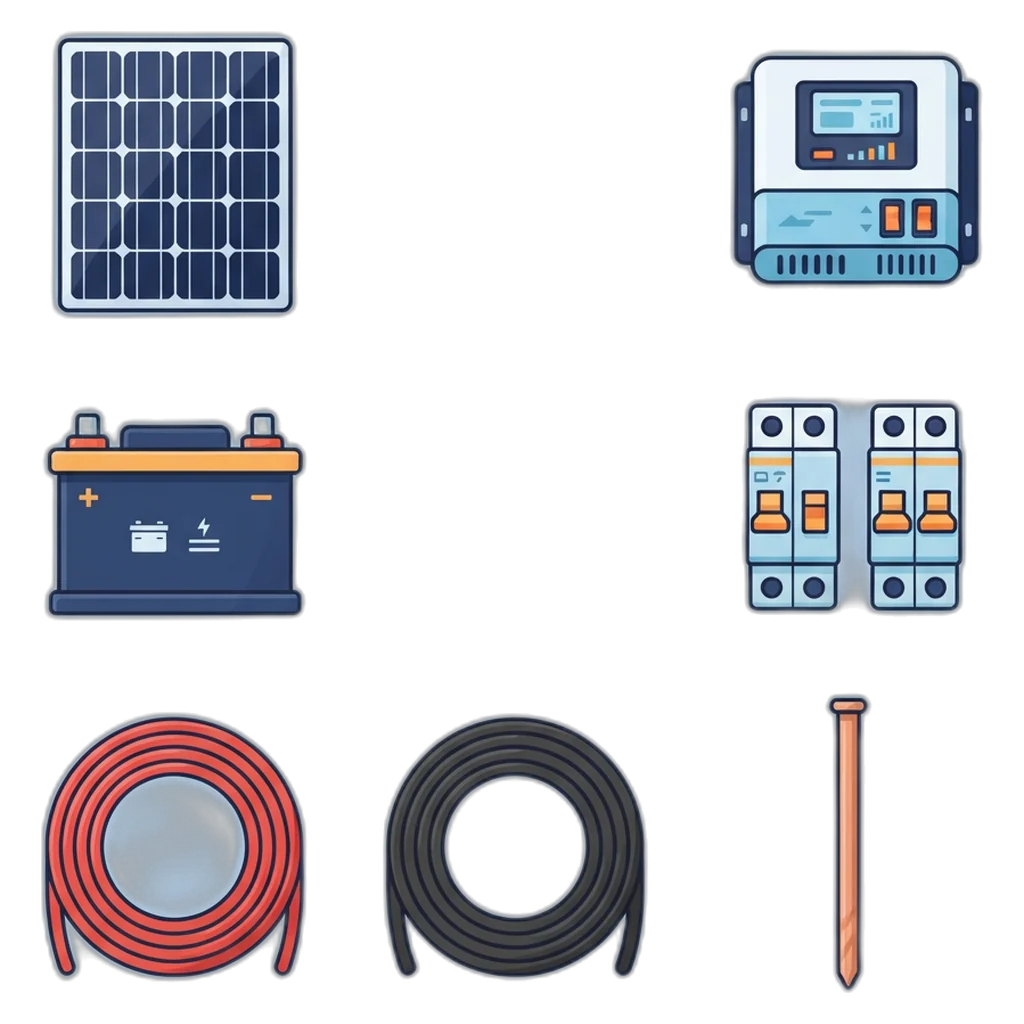
| Solar panels (PV array) | Turn sunlight into DC power. Panels wired together form a string. |
| Combiner box or PV breaker | Joins strings and lets you switch off or protect the panel side. |
| DC isolator | A manual switch that cuts panel DC so you can work safely downstream. |
| Surge protector (SPD) | Sends voltage spikes from lightning or switching to ground before they reach the electronics. |
| Charge controller: MPPT | Charges the battery from the panels and tracks the maximum power point of the panels, so it harvests more. Allows panel voltage higher than the battery. |
| Charge controller: PWM | Simpler and cheaper; the panel must suit the battery voltage (for example, a panel made for 12 V charging on a 12 V battery). Small kits only. |
| Inverter | Turns battery DC into household AC power. |
| Hybrid inverter | One box with an MPPT, a battery charger and an inverter that can also use grid power. |
| Battery and battery fuse | Stores energy for night and brownouts. The fuse sits close to the positive terminal to protect the cable. |
| BMS (battery management system) | Electronics inside a lithium battery that cut off on wrong voltage, current or temperature. |
| AC breaker | Protects the AC cable from the inverter to the loads or panel board. |
| Backup panel | A sub-panel fed by the inverter backup output, for essential loads during a brownout. |
| Net meter (bidirectional) | A utility meter that records power you import and export. |
| Grounding rod and bonding | Connects frames, racks and equipment cases to earth so a fault trips protection instead of shocking someone. |
Ratings for every fuse, breaker and cable come from the equipment manuals and a licensed electrician.
The controller rows matter most for small DIY kits. An MPPT lets you wire panels in series at a higher voltage and still charge a 12 V or 24 V battery, so the long run from the roof can use thinner cable. Read more on how maximum power point tracking works.
The color key used in our diagrams
Every solar setup diagram on this site uses the same three line styles. Boxes have tones too: blue for panels, dark navy for electronics, light orange for protection devices, a deeper orange for the battery, gray for the utility grid and meter, and green for loads and the ground rod.
| Line style | Meaning | Remember |
|---|---|---|
| Solid orange | DC power: panels, controller, battery | Panel DC is live in daylight, even with breakers off |
| Solid navy | AC power: inverter output, panel board, grid | AC panel work is for a licensed electrician |
| Green dashed | Grounding and bonding | Ground every frame, rack and case |
These colors are for the drawings only; real cable colors follow the Philippine Electrical Code.
The main solar setup diagram types
Almost every home solar setup diagram falls into one of three families, plus the all-in-one variant. The difference: does the system have a battery, and is it connected to the grid?
Off-grid: battery only, no grid
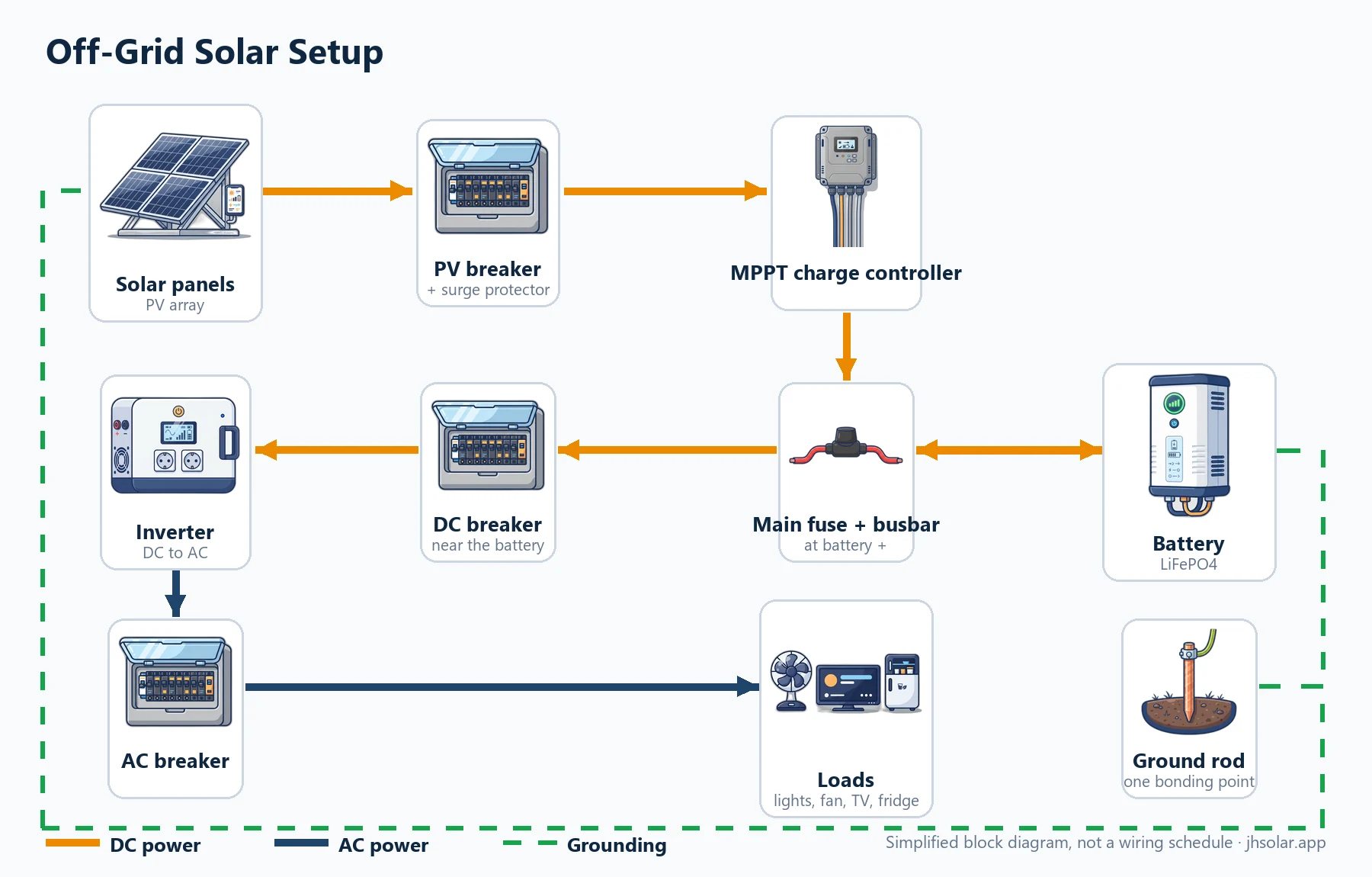
Solar panels feed a PV breaker, then an MPPT charge controller. The controller and the inverter both connect to the battery through one main fuse and busbar at the battery positive; the inverter branch also has a DC breaker near the battery. The inverter feeds an AC breaker and the household loads. The panel frames, controller, inverter and battery bond to a grounding rod.
Panels feed a charge controller through a PV breaker; the controller charges the battery through a fuse; an inverter turns battery power into AC. Nothing connects to Meralco or your cooperative, so a careful DIYer can build the DC side of a small kit. It suits nipa huts, farms and brownout corners. Follow our step-by-step off-grid solar setup guide.
Hybrid: panels, battery and grid together
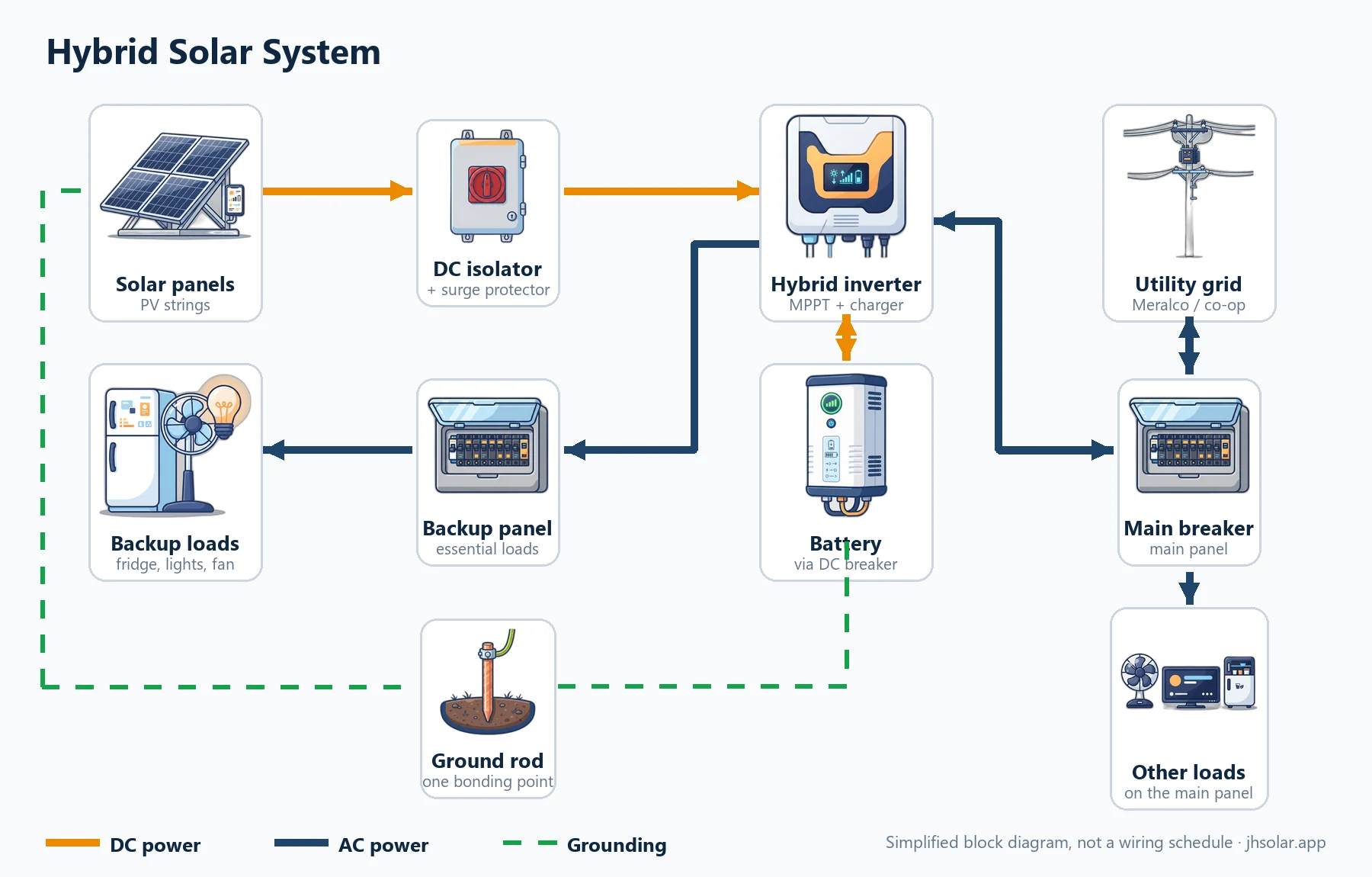
Solar panels connect through a DC isolator and surge protector to a hybrid inverter. The inverter charges and draws from a battery through a DC breaker. Utility power enters through the main breaker to the inverter grid input, and can flow back out when exporting is allowed; the inverter backup output feeds a backup sub-panel for essential loads, while other loads stay on the main panel. The panel frames, isolator and inverter bond to a grounding rod.
A hybrid inverter uses the panels, the battery and the grid. In a brownout the battery runs a backup panel for essential loads. It ties into your main panel board, so a licensed electrician installs it. Here are the inverter types explained: hybrid, grid-tie and off-grid. See the hybrid solar system diagram guide.
Grid-tied: no battery, lower day-time bill
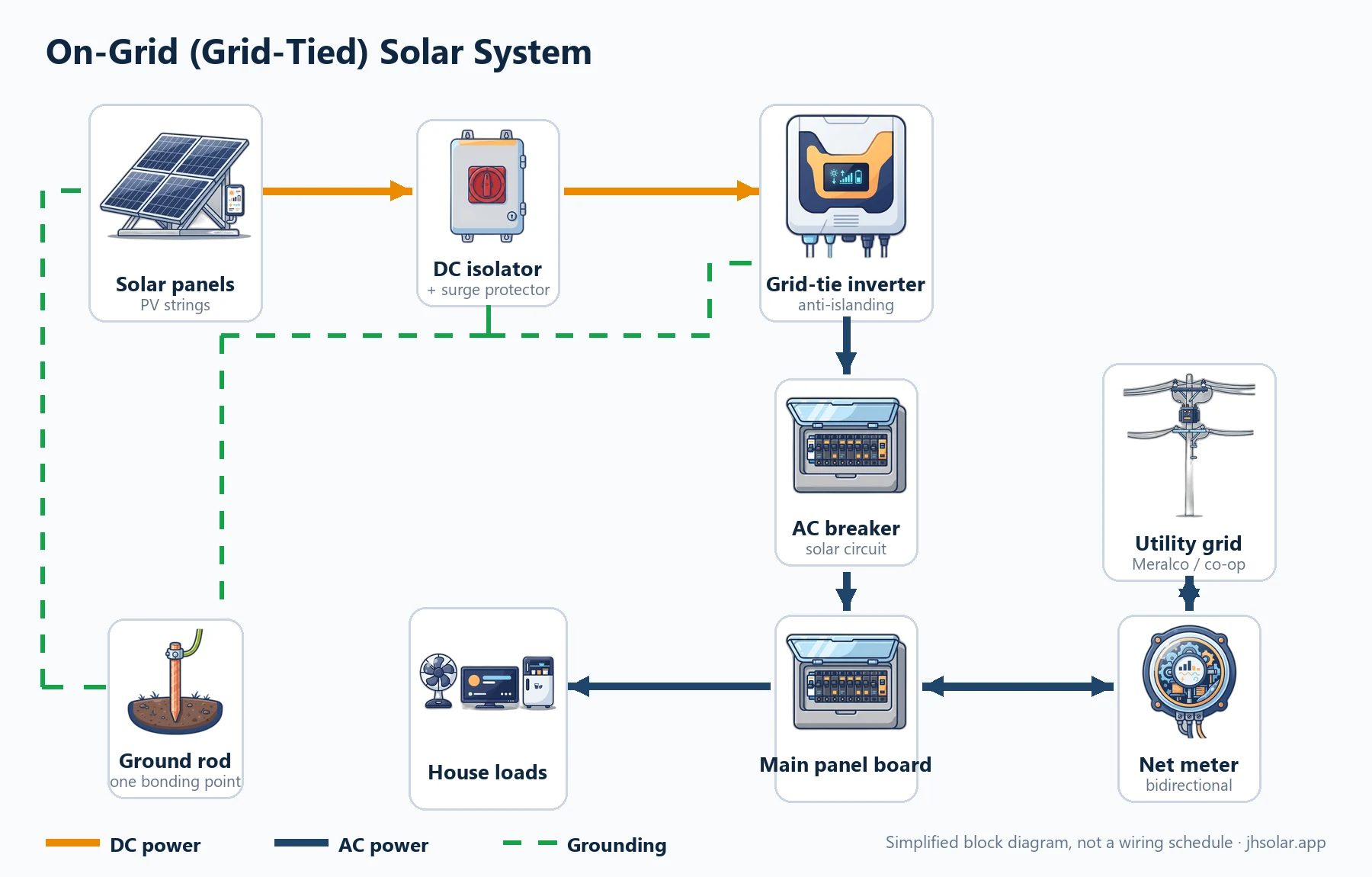
Solar panels connect through a DC isolator and surge protector to a grid-tie inverter. The inverter output goes through an AC breaker to the main panel board, which serves household loads and connects to the utility through a bidirectional net meter that records import and export. The panel frames, isolator and inverter bond to a grounding rod. There is no battery, so the system shuts off during a brownout.
A grid-tie inverter feeds the main panel board, and a net meter records what you import and export. There is no backup: the inverter shuts down in a brownout to protect line workers. Read our on-grid diagram and net metering steps.
All-in-one: inverter and battery in one cabinet
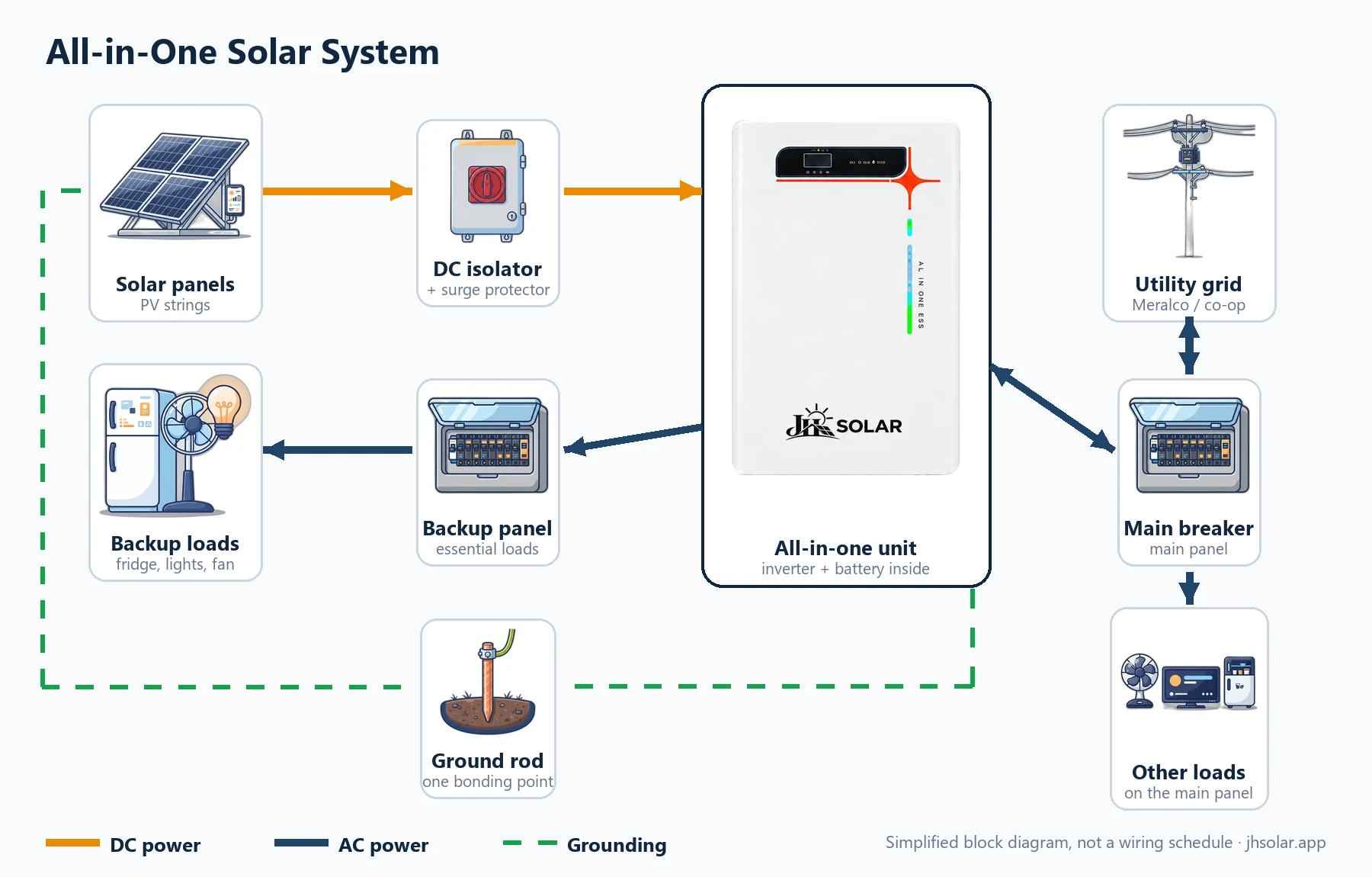
Solar panels connect through a DC isolator and surge protector to an all-in-one unit that holds the hybrid inverter and the battery in one cabinet. Utility power feeds its grid input through a breaker, and its backup output feeds the essential-loads panel.
A hybrid system where inverter and battery share one cabinet, so there are fewer boxes and DC cables on the wall. This is the type of unit sold by JH Solar: the Version 2 package lists 14 panels of 720 W (10.08 kWp) with a rated 11 kW inverter and 15.36 kWh nominal battery. See the JH Solar Version 1 and Version 2 packages; the price is confirmed after a site assessment.
Which solar setup diagram fits you?
Start from your goal, not from a kit. Backup needs a battery. A lower bill with rare outages may only need grid-tied. No grid at all means off-grid.
| Setup | Battery | Works in a brownout | Who installs | Good fit for |
|---|---|---|---|---|
| Off-grid | Yes | Yes | DIY for small DC kits; electrician for house wiring | Nipa hut, farm, rest house |
| Hybrid | Yes | Yes, backup panel | Licensed electrician | Homes and shops wanting backup and a lower bill |
| Grid-tied | No | No | Licensed electrician plus utility approval | Steady grid power, high day-time use |
| All-in-one | Built in | Yes, backup panel | Licensed electrician | A hybrid system with a tidier install |
Backup time depends on battery size and the loads you run; no setup gives a fixed number of hours.
Net metering and your solar setup diagram
Net metering lets a grid-tied or hybrid system send surplus daytime power to Meralco or your electric cooperative for peso credits on your bill. On a solar setup diagram it shows up as one box: the bidirectional net meter between your main panel board and the grid. Off-grid kits have no such box, because they never connect to the utility.
Systems up to 100 kW can apply, with or without a battery, so a hybrid or all-in-one unit can join if the utility approves the setup. Since the 2025 rule changes, unused credits roll over to later bills. You need an LGU electrical permit, a Certificate of Final Electrical Inspection, a net-metering agreement and a licensed electrician; the export side is never DIY. Our net metering guide for the Philippines walks through the steps, fees and processing times.
Step-by-step guide: plan your system from a solar setup diagram
The planning order is the same for every setup. Each step adds detail to your own drawing until it is ready to show a seller or electrician.
Step 1: Compute your daily load
Daily kWh = sum of (watts × hours) ÷ 1,000. Example: an 800 W aircon for 8 hours uses 800 × 8 = 6,400 Wh, or 6.4 kWh. Our solar setup calculator does this from your bill or a load list.
Step 2: Pick the setup type
Use the comparison table: backup means off-grid, hybrid or all-in-one; no grid means off-grid.
Step 3: List every part on the diagram
Write a real part next to each box: panel watts, controller or inverter model, battery voltage and capacity, every fuse, breaker, isolator, surge protector and the ground rod. An empty box means the list is not finished.
Step 4: Check voltages and currents on every line
String voltage must stay inside the controller or inverter limits: below the maximum on a cool morning, when voltage is highest, and above the MPPT minimum on a hot afternoon. Battery voltage must match the inverter. Current decides fuse, breaker and cable size, from the manuals.
Step 5: Plan cable routes and protection
Mark each cable run and its length. Keep DC runs short, put the battery fuse close to the battery, and draw a grounding line from every frame and case.
Step 6: Sort out permits if the system touches the grid
Hybrid, all-in-one and grid-tied systems need a licensed electrician and an LGU electrical permit. If you plan to export power, you also apply for net metering with your utility. The Meralco net metering FAQ lists the documents as of October 2026; check the current requirements with your utility.
Step 7: Install in the right order
Mount first, wire second, energize last. Each setup guide gives its own wiring order.
Step 8: Test before you trust it
Check polarity and voltage with a multimeter before closing each breaker, switch on one stage at a time, and recheck connections for heat after a few days.
What a DIYer can do safely, and what needs a licensed electrician
Some lines on a solar setup diagram are far more dangerous than others. Our rule: DIY only on small DC-side off-grid kits, always with fuses, breakers and grounding. Anything touching your AC panel board or the grid is for a registered master electrician (RME) or professional electrical engineer (PEE).
Reasonable for a careful DIYer
- Planning, sizing and drawing your own diagram, and checking a kit against it.
- Mounting panels on a low, stable rack, not a steep or high roof.
- Wiring a small 12 V or 24 V off-grid kit on the DC side.
- Plugging loads into the inverter's own outlets.
Call a licensed electrician
- Anything inside or connected to the AC panel board, including a backup sub-panel or transfer switch.
- Every hybrid, all-in-one and grid-tied installation, and any net-metering application.
- Fixed AC wiring from an off-grid inverter into walls or outlets.
- High-voltage panel strings, large battery banks, and tall or steep roofs.
A wrong AC connection can shock a line worker during a brownout, and an unfused battery cable can start a fire in seconds. The split keeps those risks with licensed professionals.
Red flags to catch on a plan or quote
If you see any of these, ask the seller or installer to explain before you pay.
- No fuse or breaker next to the battery positive terminal.
- AC-only breakers drawn or supplied for DC lines.
- No DC isolator or surge protector between the panels and the controller or inverter.
- No grounding line from panel frames, rails and equipment cases.
- A battery voltage that does not match the inverter input.
- A grid connection, backup panel or transfer switch with no licensed electrician named.
Tools for reading a diagram and building a small kit
The multimeter matters most: it checks that the real wiring matches your drawing before anything is switched on.
| Tool | Used for |
|---|---|
| Digital multimeter | Polarity, panel voltage and battery voltage before closing any breaker |
| DC clamp meter | Reading current without disconnecting a cable |
| Wire stripper and cutter | Clean cuts without nicking copper strands |
| Crimping tool | Tight cable lugs and solar connectors; loose crimps cause heat |
| Insulated and torque screwdrivers | Tightening terminals to the value in the manual |
| Safety glasses and insulated gloves | Protection near a charged battery |
On your phone: mobile tips for using diagrams
- Save the diagram. Screenshot the drawing you need into an album for your project, so it opens on the roof without signal.
- Turn the phone sideways. The diagrams are wide; landscape mode shows the full drawing and you can pinch to zoom.
- Mark up your copy. Write part models and cable lengths on the screenshot. That becomes your own diagram.
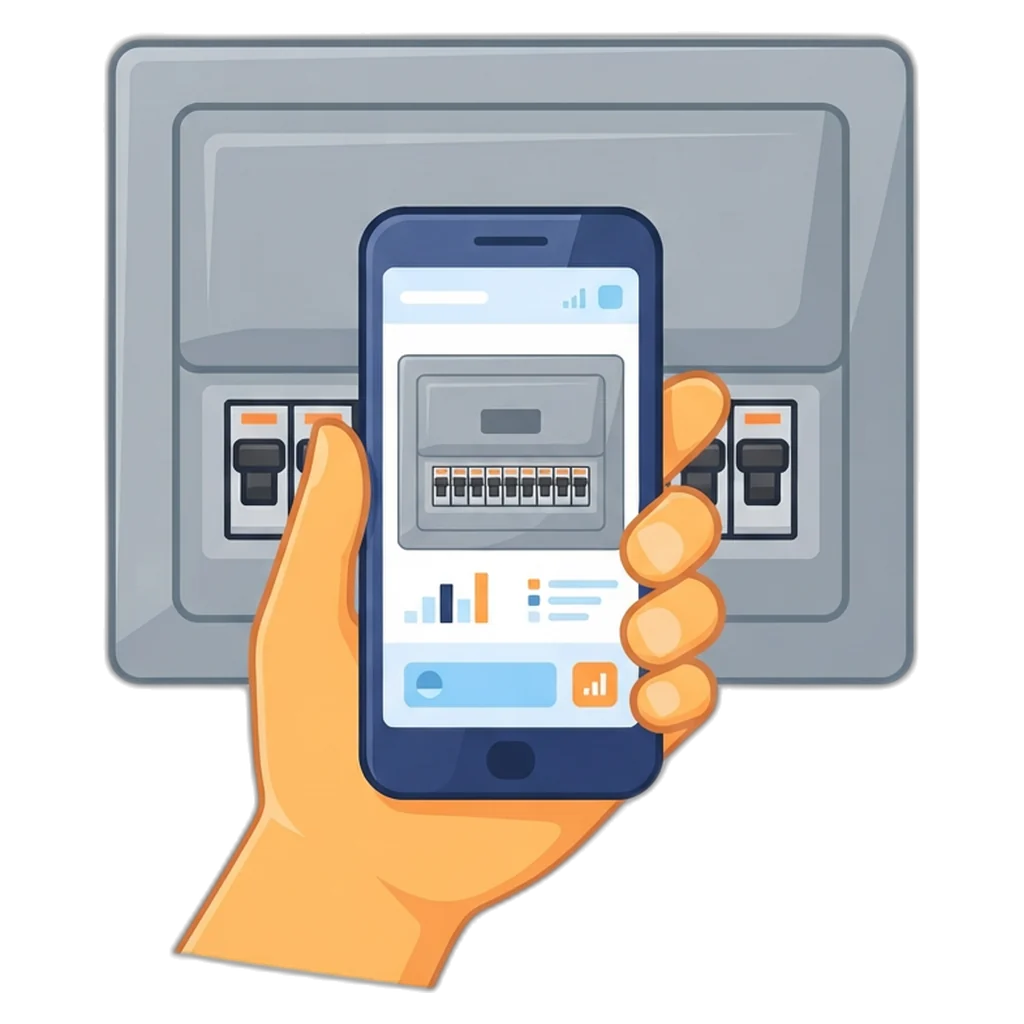
- Photograph your panel board, meter and nameplates. An electrician can check your plan faster from clear photos.
Philippine context for any solar setup diagram
- Brownouts. If outages are your main worry, look at the off-grid, hybrid or all-in-one drawings, not grid-tied.
- Meralco and cooperatives. Grid-connected systems go through your distribution utility. Net metering under the Renewable Energy Act of 2008 (RA 9513) covers systems up to 100 kW.
- Peak sun hours. Most places get about 3.5 to 5 a day. Look up your city on the Global Solar Atlas before sizing panels.
- Typhoons and rain. Mounting must suit strong winds, and cloudy rainy-season days call for more battery or panel margin.
- Heat. Mount inverters and batteries in shade with airflow, never in a closed box under direct sun.
Safety and Electrical Reminders
- Treat every orange (DC) line as live in daylight. Opening the PV breaker or DC isolator only makes the parts after it safe; the panel cables before it stay live, so cover the panels before touching them.
- Fit the battery fuse close to the positive terminal before connecting anything else.
- Never work inside the AC panel board, a transfer switch or a net-metered system yourself.
- Ground every panel frame, rack and equipment case.
- Check the DTI-BPS list of products under mandatory certification and look for PS or ICC marks where they apply.
Solar panels make DC power whenever light hits them, and batteries hold enough energy to start a fire if they are shorted. Work on the grid side, the AC panel board or a net-metered system belongs to a licensed electrical practitioner following the Philippine Electrical Code. Our numbers are estimates, not a design or a quote.
Frequently Asked Questions
Can I draw my own solar setup diagram before I buy anything?
Yes, and it is a good habit. Draw one box per part, from the panels to the loads, and write the voltage and current on each line between boxes. Add every fuse, breaker and the ground rod. A rough sketch on paper or in a notes app is enough to spot missing protection and to ask sellers the right questions.
Do the real wires follow the same colors as your diagrams?
No. The orange, navy and green lines in our drawings only help you tell DC power, AC power and grounding apart on screen. Real cable colors follow the Philippine Electrical Code, the equipment manual and your electrician. Label the actual cables with tags or tape so the next person who opens the box knows which is which.
What is the difference between a setup diagram and a wiring diagram?
A setup diagram is a block drawing that shows which parts you need and the order power flows through them. A wiring diagram, or single-line diagram, adds cable sizes, breaker ratings, terminal details and grounding for one specific system. Use the setup diagram to plan and buy, then follow the manuals and an electrician for the detailed wiring.
Can I start with a small off-grid kit and move to a hybrid system later?
You can, but most parts will not carry over one to one. Panels and a LiFePO4 battery may be reused if their voltage suits the new hybrid inverter and the battery is on its compatible list, while a small charge controller and off-grid inverter usually do not. Plan the panel and battery voltage with the bigger system in mind, and leave the grid connection to a licensed electrician.
Which setup keeps my lights on during a brownout?
Any setup with a battery: off-grid, hybrid, or an all-in-one unit with a built-in battery. A grid-tied system without a battery shuts down during a brownout, because its inverter must stop when the grid is off to protect line workers. If backup is your main goal, start from the hybrid or all-in-one diagram and size the battery for your essential loads.
What should I show an electrician when I ask them to check my plan?
Bring your sketch of the setup, nameplate photos or spec sheets of the panels, inverter, controller and battery, a list of the loads you want to run with their watts and hours, and clear photos of your panel board and meter. With these, a registered master electrician or electrical engineer can point out problems before any wire is cut.
Conclusion: read the diagram first, then build or hire
A solar setup diagram is the cheapest tool in any solar project. It shows what you need, how power flows, and where fuses, breakers and ground connections belong. Learn the parts and the color key, pick the drawing that matches your goal, and plan in order.
For a small DC off-grid kit, our step-by-step guide shows the wiring with pictures. If your plan touches the panel board or the grid, brief a licensed electrician with your diagram.
Size your system before you draw it
Work out your daily kWh, panel count and battery size, then match the result to a setup diagram.
Related Guides
- JH Solar HomeStart here: JH Solar systems and every guide on one page.
- Off-Grid Solar SetupA small battery system you can wire on the DC side yourself.
- Hybrid Solar System DiagramSolar, battery and Meralco power working together.
- Grid-Tied Solar DiagramCut the day-time bill and export extra power with net metering.
- Solar ComputationTurn your electric bill into a system size in a few taps.
- Solar Battery GuideHow much battery you need for nights and brownouts.